In this Sure Cuts a Lot tutorial, I show you how easy it is to create designs for tumblers using the Wrapper function.
Oh yeah!!!!
No fooling you. You were guessing it with the first hint today.
This really is very exciting.
Individual images will be available for $1.99 and the Digital Cartridge will be available for $29.99 - ONLY in Design Space.
Note that the Frozen images are only available in Design Space as a Digital Cartridge and/or Digital Images at this time. Images are now available in Design Space and will be available in Physical Cartridge and Cricut Craft Room format in 2015.
For purchase ONLY in Design Space.
Check out the exciting images
The easiest way to access the special characters in the Samantha font is to use Illustrator or CorelDRAW. In this tutorial, I teach you how to do that.
Further information is available in a document I have written about using character map and other options. The document is available in my Silhouette group.
Cropping a photo in Silhouette Studio is super easy.
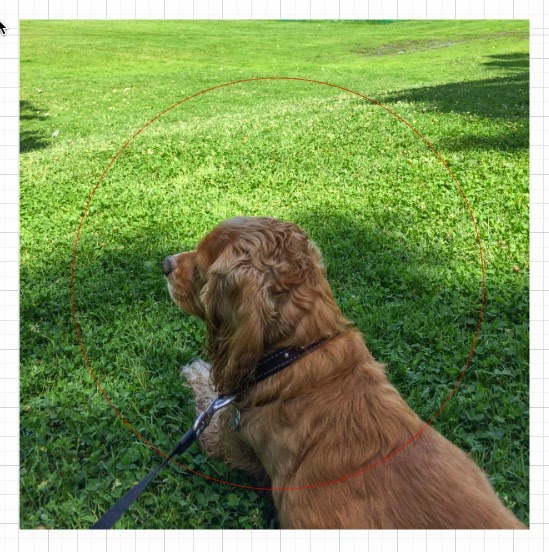
First, open your picture in Silhouette Studio using the File, Open command. It may come in very large. My photos are huge because I use the max resolution settings on my cameras. Just select the image and adjust the size by dragging the handles to make it smaller.
Select the shape you want and place it over the picture in the area you want. Here, I used an ellipse and drew a circle over the area I want to keep.
Next, select everything (your picture and the cut line), then click the Modify icon at the top of the screen.
Now click the Crop icon.
Your photo will be cropped to the shape.
You do exactly the same thing to crop using a cutting file.
Below I chose a heart from my library.
After cropping, my photo of Percy is cropped to the heart shape.
Be sure to follow my blog for many more tips and tricks.
New version 4 of Sure Cuts A Lot and Sure Cuts A Lot Pro are now available with:
- New enhanced interface
- New tools, including freehand, brush, erase, knife, & more
- Stencil tool to easily create stencil bridges
- Type on arch
- Various effects, including 3D Rotate, Bulge, Wave, Wrapper & more
- Additional fill & stroke options
- Multi-line text with text justify options
- Snap to objects
- Rotated duplicate
- and more!
Works with Black Cat Cougar/Lynx, Gazelle, eCraft, CraftRobo/Graphtec, GCC, Foison (set up as Foison to use SCAL with your KNK), Liyu, Pazzles Inspiration/Pro/Vue, Ramtin, Roland, Seiki, Silhouette SD/CAMEO/Portrait, SilverBullet, USCutter, Vinyl Express, Wishblade & more.
- Export FCM for Brother ScanNCut
- Export SVG for use with Cricut Design Space
Special introductory sale price:
Upgrade to version 4 for only $19.99 (regularly $30)
Upgrade to version 4 Pro from version 1 - 3 for only $99 (regularly $125)
Upgrade to version 4 Pro from version 3 Pro for only $49.99 (regularly $74.99)
One of the many cool things you can do with SCAL is described in the video below
test
All of the following cutting files from my Etsy shop are now available to my Patreon supporters for as little as $1 per month.
Enjoy!!!!