Showing posts with label Design Space. Show all posts

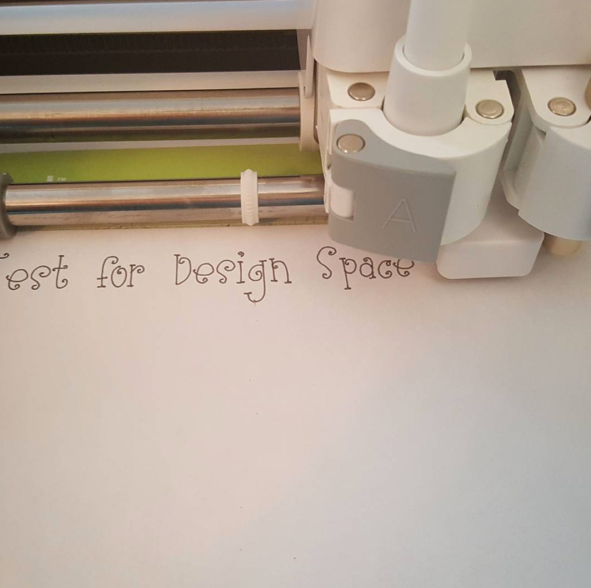
Did you know that thin fonts from Lettering Delights can be used in Design Space to write with your Cricut Explore?

Lettering Delights thin fonts can be used in Make the Cut to create designs that you can save in SVG format and upload into Design Space which you can then write with a pen or marker using your Cricut Explore.

(note that you can click all the images below to see more detail)

I clicked the Import Font File icon in the top right corner and then chose the .opf file from my directory.


To save as an SVG file, the design must be selected.
In Design Space, I changed the line attribute to Write


You can test the file I created for yourself. You can download the Test for Design Space file in SVG format by clicking here.

This video teaches you how to upload SVG files into Design Space:


In this Cricut Design Space tutorial, I put together one of the cards from the Anna's Lovely Layered Cards cartridge. I also explain the sizing.

Products used in this project:
- - - - - - - - - - - - - - - - - - - - - - - -
Cricut Explore One http://bitly.com/1KhptJj
Anna's Lovely Layered Cards cartridge http://bitly.com/1THefCK
Cricut vellum (metallics) http://amzn.to/1U0FFUm
Cricut card stock http://bitly.com/1HOBKDh
Cricut trimmer http://bitly.com/1JaIyAh
Cricut scissors http://bit.ly/1eiQHGF
Cricut spatula http://bitly.com/1gLgnwJ
American Crafts cutting mat http://amzn.to/1hFpRKQ
ATG adhesive gun http://bitly.com/1THXtcd
Xyron sticker maker http://amzn.to/1DVcKPU


Note that affiliate links are used in this post. Please see my Affiliate Links page for full disclosure information.

This is the last Design Space plugin you will ever need. It has been tested extensively by over 300 beta testers and now it's ready for you.

In the future, updates will be transparent and automatic. No more downtime for updates.

This video shows you what you can expect.


If you want to learn how to use your die cutting software, be sure to subscribe to my YouTube channel.


I had originally posted a video explaining this technique using Silhouette Studio, but it is so popular, I was asked to teach the technique using SCAL as well so that all my Cricut friends can also create a file like this and cut it with their Cricut Explore.

So many people have been posting pictures of t-shirts and hoodies they decorated with this technique and it's really fun to be able to share the information.

The video below shows you how this is done.


If you missed my video on using this technique with Silhouette Studio, I am posting it again below.


If you would like to have my MAN'S BEST FRIEND cutting file, it is available in my Etsy store


So many people have been asking me which machine I would recommend because they know I have extensive experience with both.

This video shows you the types of thick materials the Explore can handle.

My recent videos on applying vinyl to a Christmas ornament and on re-organizing my kitchen pantry show you how versatile the Cricut Explore really is. It can cut the thinnest materials, such as vinyl, vellum and copy paper, to the thickest materials you will use in crafting, such as shrink film, acrylic, heavy chipboard, ripple board, poster board, foam and cork.

Silhouette claims the Cameo can cut chipboard, but the material they sell as chipboard is actually a medium weight kraft card stock. I have had some and was very disappointed.

In any case, this video clearly shows you that the Cameo is incapable of cutting the thinnest material I show here.


Everybody is raving about the Print then Cut function on the Explore. Beautiful results with very simple steps. It is truly easy to create fabulous stuff.

Watch my videos on my YouTube channel. Click right here to subscribe. I will tell you how you can win your very own Explore in an upcoming video.

There are also packages of the fantastic new Printable Vinyl and Printable Sticker Paper to be won. You will have them before anyone else because they are not even available through Cricut yet!!!

Good luck everybody.